
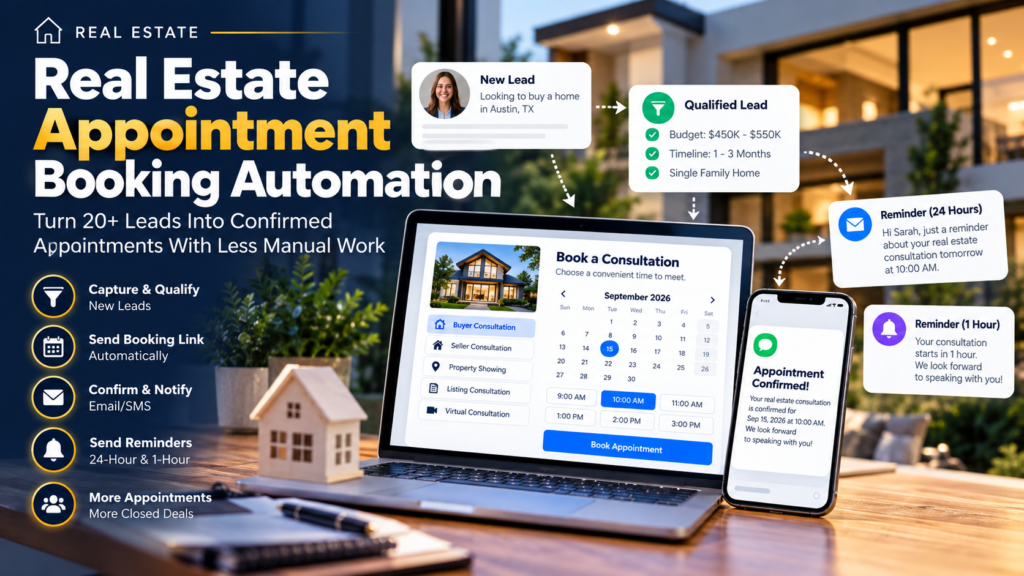
Real estate appointment booking automation can help Realtors move qualified leads from an initial conversation to a scheduled appointment without relying on endless emails, phone calls, or manual reminders.
Imagine you’re managing 20+ active buyer and seller leads.
One buyer wants to discuss homes this week. Another asks for a call next Tuesday. A seller wants a property consultation but hasn’t confirmed a time. Three other prospects said they were interested but haven’t responded to your last message.
Meanwhile, you’re handling showings, listings, existing clients, paperwork, and new enquiries.
The problem isn’t necessarily generating more leads.
It’s creating a clear path for interested leads to actually schedule time with you.
That’s where appointment booking automation becomes useful.
A simple system can qualify a prospect, provide an appropriate booking option, let them choose an available time, confirm the appointment, and send reminders before the meeting.
The Realtor still handles the relationship.
Automation simply handles many of the repetitive scheduling tasks around it.

Table of Contents
What Is Real Estate Appointment Booking Automation?
Real estate appointment booking automation is a system that helps move an interested real estate prospect from enquiry or conversation to a scheduled meeting with less manual scheduling.
A simple workflow could look like this:
New Lead → Response → Qualification → Booking Option → Appointment → Confirmation → Reminder
Suppose a buyer submits an enquiry through your website.
The buyer indicates that they are looking for a single-family home in Austin with a budget of approximately $500,000 and plans to purchase within three months.
Instead of manually exchanging several emails to find a suitable meeting time, the qualified prospect can receive an appointment booking option.
They select an available time.
The appointment is added to the calendar.
A confirmation is sent.
Before the consultation, reminder messages can be triggered automatically.
That’s the basic idea.
It connects naturally with a broader real estate follow-up automation system, where appointment booking becomes one stage of the complete lead journey.
Why 20+ Leads Make Manual Appointment Booking Difficult
Twenty leads doesn’t mean 20 appointments.
Some prospects may be ready to speak immediately.
Others may still be researching.
Some won’t respond.
Others might need several follow-ups before they’re ready for a consultation.
The 20+ figure here is simply an example scenario, not an industry benchmark.
The challenge appears when several genuinely interested prospects need different appointment times.
A typical manual conversation might look like this:
Agent: Are you available Tuesday afternoon?
Lead: No. Wednesday works better.
Agent: Would 2:00 PM work?
Lead: I have a meeting then. What about 4:00?
This isn’t a serious problem when it happens once.
But repeat the same process across multiple prospects while managing an active real estate business, and scheduling can become another administrative task competing for your attention.
Real estate appointment booking automation creates a more structured process.
How Real Estate Appointment Booking Automation Works
The system doesn’t need to be complicated.
A practical workflow can follow seven stages:
1. Capture the lead
↓
2. Respond to the enquiry
↓
3. Qualify the prospect
↓
4. Offer an appropriate appointment
↓
5. Prospect chooses an available time
↓
6. Send confirmation and reminders
↓
7. Realtor handles the consultation
Automation supports the process around the appointment.
It doesn’t replace the actual conversation between the Realtor and prospect.
Step 1: Capture and Qualify the Lead
Before sending every new lead directly to your calendar, understand who the prospect is and what they need.
A basic enquiry form might collect:
- Name
- Phone number
- Buyer or seller
- Preferred location
- Budget range
- Property type
- Timeline
Suppose a prospect provides:
Lead Type: Buyer
Location: Austin, TX
Budget: $450,000–$550,000
Property Type: Single-family home
Timeline: 1–3 months
The information gives the Realtor useful context before deciding what should happen next.
This is why appointment booking works well alongside a real estate lead qualification process.
Not every enquiry needs an immediate consultation.
Qualification helps identify which leads are ready for the next step.
Step 2: Use Real Estate Appointment Booking Automation to Offer the Next Step
Once a prospect is ready to speak with the agent, make the next step obvious.
Instead of writing:
“Let me know when you’re free.”
you can provide a clear booking option.
Depending on your business, this could be:
Buyer Consultation
Seller Consultation
Property Showing
Listing Consultation
Discovery Call
Virtual Consultation
For example:
I’d be happy to discuss what you’re looking for. You can choose a convenient consultation time from my available appointments here.
The prospect now knows exactly what to do.
This is an important part of real estate appointment booking automation because the workflow isn’t simply sending emails—it is moving the prospect toward a defined next action.
Step 3: Let Prospects Choose an Available Time
A booking calendar allows the prospect to see the times you’ve made available.
For example, you might offer:
Monday–Friday
9:00 AM–5:00 PM
30-minute consultations
You remain in control of your availability.
The prospect simply chooses from the available options.
This can reduce unnecessary scheduling exchanges.
You can also create different calendars for different appointment types if your process requires it.
For example:
Buyer Consultation — 30 Minutes
Seller Consultation — 30 Minutes
Property Showing — Custom Duration
Keep the initial setup simple.
You don’t need a separate calendar for every possible situation unless it genuinely improves your workflow.
Step 4: Automate Appointment Confirmations
Once the prospect books a time, the next part of real estate appointment booking automation is confirmation.
The prospect should know that the appointment was successfully scheduled.
A confirmation email could say:
Hi Sarah, your real estate consultation is confirmed. We look forward to speaking with you and learning more about your property needs.
The message can include relevant appointment information such as the scheduled date and time.
This removes the need for the Realtor to manually send a confirmation after every booking.
The appointment can also move into the appropriate stage of your pipeline.
For example:
Qualified → Appointment Booked
Now your CRM can provide a clearer picture of which prospects are simply being nurtured and which have actually scheduled time with you.
Step 5: Real Estate Appointment Booking Automation for Reminders
Booking the appointment isn’t necessarily the end of the administrative process.
People get busy.
A prospect might schedule a consultation several days in advance and simply forget about it.
Automated reminders can provide useful prompts before the meeting.
For example, your real estate appointment booking automation might include:
24 Hours Before Appointment → Reminder Email
and
1 Hour Before Appointment → Final Reminder
A 24-hour reminder might say:
Hi Sarah, just a quick reminder that your real estate consultation is scheduled for tomorrow. We look forward to speaking with you about your property needs.
Then, closer to the appointment:
Hi Sarah, your real estate consultation starts in about one hour. We look forward to speaking with you soon.
The exact reminder timing should match your business and appointment type.
The objective is simply to make the process easier for both the agent and prospect.
Step 6: Handle Rescheduling and Cancellations
Plans change.
A buyer may have a work meeting.
A seller might have a family commitment.
An agent’s schedule can change too.
A useful booking system should have a clear process for rescheduling or cancelling when appropriate.
Without one, the conversation can return to:
“What other day works for you?”
If your booking platform supports rescheduling, prospects may be able to choose another available time without restarting the entire scheduling conversation.
Your workflow should also make sure cancelled appointments don’t continue receiving irrelevant reminders.
This is where careful workflow testing matters.
Automation should reflect what is actually happening with the appointment.
Step 7: Follow Up After the Appointment
Real estate appointment booking automation shouldn’t necessarily stop the moment the meeting begins.
What happens afterward depends on the outcome.
Imagine three prospects.
Prospect A — Ready to Move Forward
The buyer has clear requirements and wants to begin viewing suitable homes.
Their next stage might be active opportunity follow-up.
Prospect B — Interested but Not Ready
The prospect likes your approach but plans to purchase six months from now.
They may be better suited to a longer-term real estate lead nurturing automation workflow.
Prospect C — Stops Responding
The lead attended a consultation but then disappeared.
Depending on the circumstances, they may later become appropriate for real estate lead reactivation.
The appointment isn’t the entire lead journey.
It’s an important transition point within it.
How GoHighLevel Can Help With Real Estate Appointment Booking Automation
GoHighLevel is one platform that can be configured to connect several parts of this process.
A simplified setup could look like:
Lead Form → Contact → Pipeline → Follow-Up Workflow → Calendar → Appointment → Confirmation → Reminders
For example, a Realtor could create a contact when a property enquiry form is submitted.
The lead could enter a pipeline.
Follow-up can begin.
Once the prospect is qualified and interested in speaking, they can be directed toward an appointment calendar.
After the appointment is booked, another workflow can send confirmation and reminder messages.
The opportunity can also be moved to an Appointment Booked stage.
If you’re already exploring the platform, see our guide on how to automate real estate lead follow-up using GoHighLevel.
You can also review HighLevel’s official website for current information about its platform and features.
Connect Open House Leads to Appointment Booking
Appointment automation can also work particularly well after an open house.
Suppose 30 people register at an event.
Some are casual visitors.
Some are neighbors.
Several are genuine prospects.
Your real estate open house follow up automation can capture and nurture those visitors first.
When an interested visitor wants another property viewing or buyer consultation, real estate appointment booking automation provides the next step.
The journey becomes:
Open House → Registration → Follow-Up → Qualification → Appointment Booking → Consultation
This is why individual automations are more useful when they work together rather than existing as disconnected tools.
Connect Fast Lead Response to Appointment Booking
Scheduling also depends on what happens before the booking link is sent.
A new online lead who receives no response for days may never reach the appointment stage.
A structured real estate lead response time process can help ensure new enquiries receive appropriate attention.
The complete journey might be:
New Enquiry → Response → Conversation → Qualification → Booking → Appointment
Each stage has a purpose.
The objective isn’t to automate everything.
It’s to reduce unnecessary gaps between those stages.
What Should Realtors Measure?
Don’t measure the success of real estate appointment booking automation only by the number of calendar bookings.
Look at the complete journey.
Useful metrics can include:
Qualified Leads
↓
Booking Links Sent
↓
Appointments Booked
↓
Appointments Attended
↓
Opportunities Progressed
If many qualified prospects receive a booking option but very few schedule, investigate the booking process.
Is the next step clear?
Are suitable appointment times available?
Is the calendar difficult to use?
If appointments are booked but frequently need to be rescheduled, look at your availability and reminder process.
Your own data will be more useful than assuming a generic conversion rate applies to every real estate business.
Common Real Estate Appointment Booking Automation Mistakes
A booking system can still create friction if it isn’t designed carefully.
Sending Booking Links Too Early
Not every new enquiry is ready for a consultation.
Understand the prospect first.
Offering Too Many Appointment Types
Too many choices can make a simple process unnecessarily confusing.
Start with the appointments you actually need.
Forgetting Confirmation Messages
After booking, make it clear that the appointment has been scheduled.
Not Sending Reminders
If an appointment was booked several days earlier, a reminder can help keep the meeting visible.
Ignoring Time Zones
This becomes particularly important if prospects and team members operate across different regions.
Continuing Irrelevant Automation
Once the prospect books or starts a genuine conversation, make sure earlier automated sequences still make sense.
Never Testing the Complete Journey
Submit your own test lead.
Book an appointment.
Check the confirmation.
Check the pipeline.
Test rescheduling.
Review the reminders.
A workflow that looks correct on a screen still needs to work correctly for the person using it.
How Appointment Automation Fits Into a 24/7 Lead Conversion System
Appointment booking shouldn’t be viewed as an isolated tool.
It is one stage of a broader conversion process.
A complete system might look like:
Lead Capture → Fast Response → Qualification → Follow-Up → Nurturing → Appointment Booking → Reminders → Consultation
Your 24/7 real estate lead conversion system can connect these stages so that a lead has a clearer path from initial enquiry to actual conversation.
The Realtor remains essential throughout the process.
Automation simply handles repeatable operational tasks around the relationship.
Final Thoughts: Make the Next Step Easy for Qualified Leads
Generating leads is only useful when those leads have somewhere to go.
A prospect can respond to your emails, answer qualification questions, and show genuine interest—but if scheduling the next conversation becomes difficult, unnecessary friction has been introduced at an important stage.
Real estate appointment booking automation gives qualified prospects a clearer route toward a consultation or showing.
Start simple:
Qualify → Offer Appointment → Book → Confirm → Remind → Consult
Then test the complete process yourself.
If you’re managing 20+ leads, the objective isn’t to automatically turn every one of them into an appointment.
It’s to make sure the people who are genuinely ready to speak with you have a simple, organized way to take that next step.
Pingback: Real Estate Lead Routing Automation: 7 Powerful Ways to Connect Leads Faster - The autoscale agency